
Most people use Facebook for years. They use this app without realizing how much personal data it is quietly storing. It collects your photos, the messages you send, your likes, your searches, and even location history. All this data can be stored on Facebook’s servers without your consent. This data can be used by scammers and cybercriminals to scam you. So, if you care about privacy, it is really important to check what Facebook is storing and gain control over data again. In this blog, you’ll learn how to request your data from Facebook and how to delete it using simple yet effective steps. So, let’s get started.
What Information Does Facebook Store?
Facebook might keep a pretty broad mix of data, like
- Posts
- Photos
- Messages
- Comments
- Search history
- Login locations
- Devices
- Ad interests
- Overall activity.
In the end, that kind of information can tell a lot about how you behave online.
Steps to Request Your Data from Facebook and Delete It
Step 1: Open Facebook Settings
- First, go and log in to your Facebook account.
- Tap your profile picture.
- Open Settings & Privacy.
- Then choose Settings.
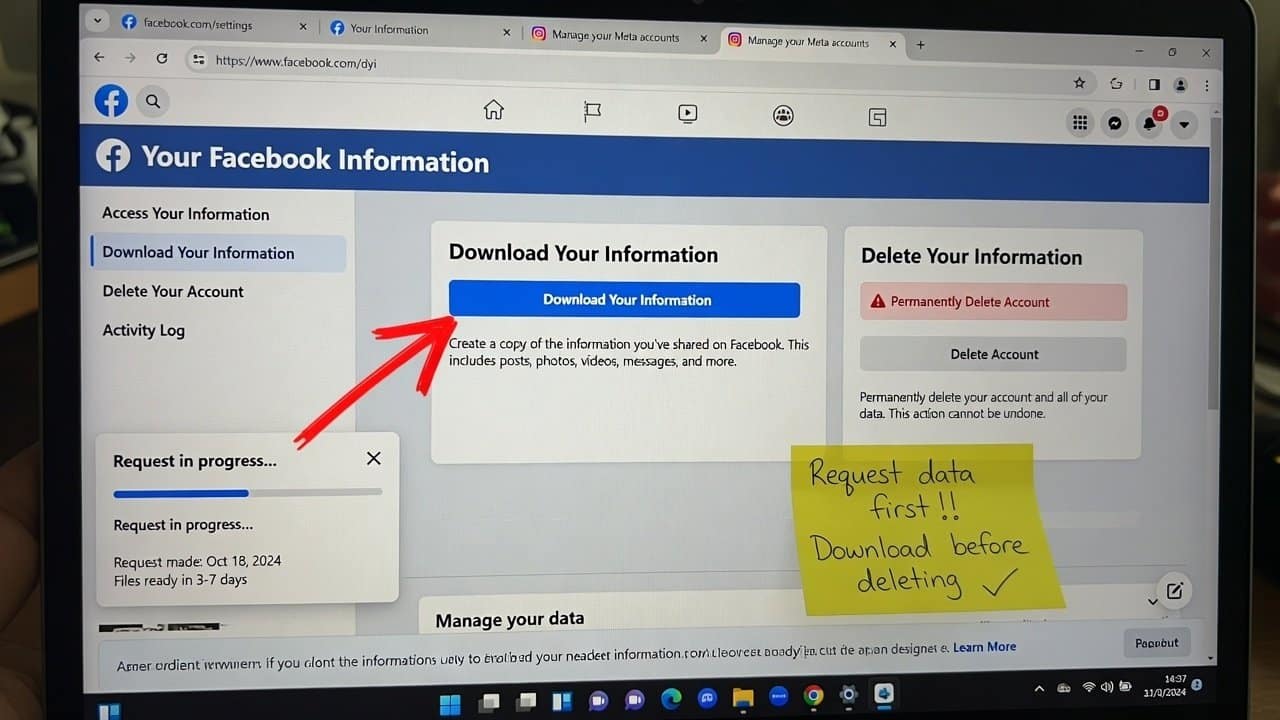
- After that, go to Your Facebook Information.
In there, you’ll find tools that help with downloading your data and keeping it organized.
Step 2: Request a Copy of Your Data
Secondly, click to download your information.
You can pick:
- Date range
- File format (HTML or JSON)
- Media quality
- Specific categories of data
- Once you select those, click Request Download.
Facebook will arrange your archive and send you a heads-up when it is ready.
Step 3: Download and Review the File
- Thirdly, once your file is ready, download it to your device.
- Open the archive and take a look at what Facebook has saved there.
- You might be pretty surprised by how much info is there.
- This part kinda helps you figure out what you should delete.
Step 4: Delete Specific Data
Fourthly, Facebook lets you delete the following:
- Search history
- Activity log entries
- Posts and comments
- Ad interests
Getting rid of unneeded data helps your privacy a lot.
Step 5: Clear Off-Facebook Activity
Fifthly, Facebook also keeps tabs on activity from other websites and apps.
- Go to Off-Facebook Activity and clear out this info.
- You can also disconnect the future tracking if you want.
This really cuts down the amount of data gathering.
Step 6: Delete Your Facebook Account
- Lastly, if you want to wipe everything for good, then you can delete your account.
- Before taking that step, make sure you have already downloaded your data.
- Account deletion will erase your profile as well as related records.
Tips to Improve Privacy
Follow these tips to protect your data a bit more clearly:
- Firstly, review your privacy settings regularly.
- Secondly, keep a tighter leash on who can see your posts.
- Thirdly, if something feels irrelevant, disable those extra app permissions.
- Lastly, turn off ad personalization too.
Conclusion
In conclusion, Facebook keeps a huge pile of personal details about everyone. But it also gives you the right to look it up and erase it. You just have to request your data from Facebook and delete it. Additionally, you take a moment to download the details they have about you. And after this you can remove the records you no longer need. In this way, you can make your privacy and security feel much more reliable. Therefore, make sure to watch it for a few minutes in your everyday life so that you can have control over your digital life.